
DJI RC Pro 2
Applicable Products
DJI Mini 5 Pro, DJI Mavic 4 Pro, DJI Air 3S, DJI Air 3, DJI Mini 4 Pro.
Charging Type and Charging Time
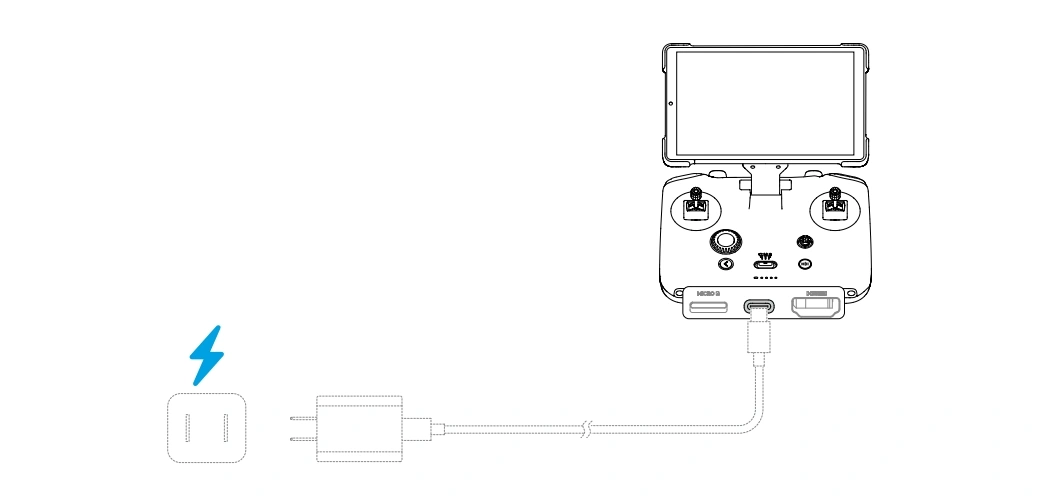
DJI RC Pro 2 supports PD Protocol and up to 65W fast charge (20V/3.25A).
Connect the USB-C charger to the USB-C port underneath the remote control for charging. Charging time is about 90 minutes with the 20V/3.25A DJI 65W portable charger. When charging, the battery indicator will light up in the form of a running light, and when it is fully charged, the battery indicator will turn off, and the charging can be completed by disconnecting the power supply.

DJI RC-N3/RC-N1/RC-N2/RC-N1C Remote Controller
Connect the USB-C charger to the USB-C port at the bottom of the remote controller, and the Battery Level LEDs in an array blink successively. The battery can be fully charged in about 3 hours and 30 minutes with a maximum charging power of 10 W. After the battery is fully charged, the Battery Level LEDs turn off, and then remove the charger after charging is complete.

DJI RC/DJI RC 2
Connect the USB-C charger to the USB-C port at the bottom of the remote controller, and the Battery Level LEDs in an array blink successively. The battery can be fully charged in about 1 hour and 30 minutes with a maximum charging power of 15 W. After the battery is fully charged, the Battery Level LEDs turn off, and then remove the charger after charging is complete.

MR1SS5/MR1SD25 Remote Controller
Use a Micro USB cable to connect the USB charger to the Micro USB port on the upper left corner of the remote controller, and the Battery Level LEDs in an array blink successively. The battery can be fully charged in about 2 hours with a maximum charging power of 10 W. After the battery is fully charged, the Battery Level LEDs turn off, and then remove the charger after charging is complete.
DJI RC Pro
Connect the USB-C charger to the USB-C port at the bottom of the remote controller, and the Battery Level LEDs in an array blink successively. The battery can be fully charged in about 2 hours by using a USB charger rated 12 V. After the battery is fully charged, the Battery Level LEDs turn off, and then remove the charger after charging is complete.

DJI Smart Controller
Connect the charger to the USB-C port at the bottom of the remote controller, and the Battery Level LEDs in an array blink successively. The battery can be fully charged in about 2 hours with a provided DJI charger. After the battery is fully charged, the Battery Level LEDs turn off, and then remove the charger after charging is complete.
DJI FPV FC7BGC Remote Controller
Connect the charger to the USB-C port at the bottom of the remote controller, and the Battery Level LEDs in an array blink successively. The battery can be fully charged in about 2 hours and 30 minutes with a provided DJI charger. After the battery is fully charged, the Battery Level LEDs turn off, and then remove the charger after charging is complete.
GL300K & GL300L Remote Controller with a Built-in Screen
Connect the charger to the charging port on the right side of the remote controller, and the Battery Level LEDs in an array blink successively. The battery can be fully charged in about 3 hours with a provided DJI charger. After the battery is fully charged, the Battery Level LEDs turn off, and then remove the charger after charging is complete.
Recommended Charger Wattage
| Remote Controller | Recommended Charger |
|---|---|
| DJI RC | Up to 18W USB-C PD |
| DJI RC 2 | 18W–30W USB-C PD |
| DJI RC Pro | 30W–65W USB-C PD |
| DJI RC-N1 / RC-N2 / RC-N3 | 10W–18W USB-C |
Higher-wattage USB PD chargers are generally safe because DJI controllers only draw the amount of power they are designed to accept.
Battery Care Tips
To maximize battery life:
- Recharge the controller before the battery reaches 0%.
- Avoid storing the controller with a completely discharged battery.
- If the controller will not be used for several weeks, store it with approximately 40%–60% battery charge.
- Keep the controller away from direct sunlight and excessive heat.
- Charge in a cool, dry, and well-ventilated environment.
- Use only genuine DJI or certified charging accessories.
- Periodically recharge the controller during long-term storage to maintain battery health.
Frequently Asked Questions
Can I use a phone charger?
Yes. A quality USB-C charger that supports the recommended voltage and power output is suitable for DJI remote controllers.
Is fast charging supported?
Yes. Models such as the DJI RC 2 and DJI RC Pro support fast charging when used with compatible USB Power Delivery (PD) chargers.
Can I charge the controller with a power bank?
Yes. A USB-C PD-compatible power bank is a convenient option for charging while traveling or working outdoors.
Can I use the controller while it is charging?
Yes, in most cases. However, charging may take longer, and the controller can become warmer during use. For the best charging efficiency, allow it to charge without operating it whenever possible.
Should I unplug the controller after it reaches 100%?
Yes. Disconnecting the charger after the battery is fully charged is a good practice for maintaining long-term battery health.
Common Charging Mistakes to Avoid
- Using low-quality or uncertified chargers
- Charging in high-temperature environments
- Using damaged USB cables
- Leaving the controller fully discharged for long periods
- Exposing the controller to water or excessive humidity
- Blocking ventilation while charging
Buy Genuine DJI Remote Controllers & Accessories in Bangladesh
Looking for authentic DJI remote controllers, charging accessories, batteries, or replacement cables? Drone Fly BD offers a wide range of genuine DJI products along with expert product guidance and after-sales support in Bangladesh.
Whether you need a DJI RC, DJI RC 2, DJI RC Pro, or RC-N series controller, our team can help you choose the right accessories and provide advice on proper charging and maintenance.
Final Thoughts
A properly charged remote controller ensures reliable connectivity, safer flights, and a longer battery lifespan. By using DJI-recommended chargers, following proper charging practices, and taking care of the controller's battery, you can enjoy consistent performance every time you fly.
For genuine DJI products, accessories, and professional support in Bangladesh, choose Drone Fly BD as your trusted DJI partner.
Comments (0)
Related Posts
Drone Price in Bangladesh 2026 – Complete Buyer's Guide (DJI, GPS & Budget Drones)
Looking for drone prices in Bangladesh? This 2026 guide covers all drone categories - DJI drones, GPS drones, and budget...

DJI Mini 5 Pro Price in Bangladesh
DJI Mini 5 Pro Price in Bangladesh – Full Review & Features (2026)DJI Mini 5 Pro Price in BangladeshThe DJI Mini 5 P...

DJI Fly and DJI GO 4 Flight Record & Flight Controller Data Export Guide
DJI FlyAndroid Devices1. Connect the mobile device to the computer with the USB cable and open the disk.2. Find and open...